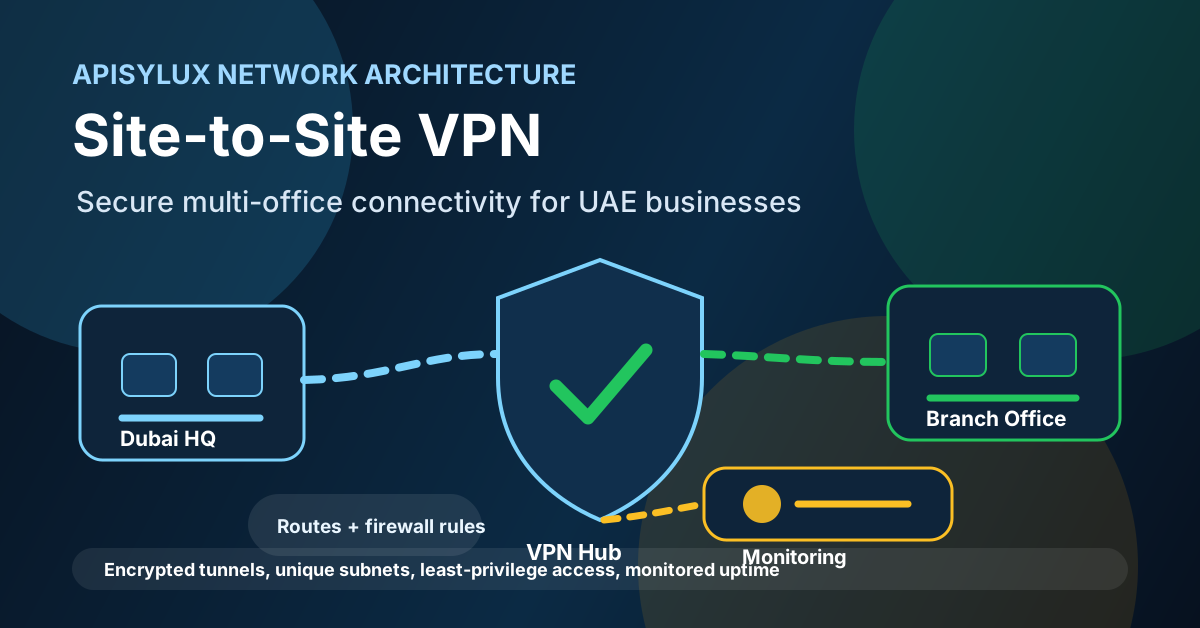
A site-to-site VPN connects office networks to each other, not just individual users to one office. For a UAE business with a Dubai headquarters, a branch office, a warehouse, or a private server environment, the goal is controlled private connectivity: defined subnets, encrypted tunnels, strict firewall rules, monitored uptime, and a documented recovery path.
When a site-to-site VPN makes sense
Use a site-to-site VPN when two or more fixed networks need persistent private connectivity. Typical examples include a head office and branch office sharing ERP access, a warehouse reaching inventory systems, a private server network hosting internal applications, or a backup site receiving replication traffic.
Need help with IT Infrastructure?
Get a free strategy session with our experts — no commitment required.
Do not use a site-to-site VPN as a general bypass tool. TDRA publishes official digital infrastructure services that include secure virtual networking and VPN features, and it also publishes website blocking and unblocking services for content that violates UAE laws. Treat your business VPN as documented corporate network infrastructure: approved destinations, approved users, approved devices, and no bypass objective.
For employee laptops and contractors, start with the companion VPN setup guide for remote teams. For fixed locations, continue with the design steps below.
Architecture patterns
Most UAE multi-office networks fit one of three patterns. The right pattern depends on where shared systems live, how many offices exist, and whether branch-to-branch traffic is common.
| Pattern | How it works | Use when | Watchpoint |
|---|---|---|---|
| Point-to-point | Two sites connect directly through one encrypted tunnel. | You have two offices or one office plus a private server network. | Adding a third site may require a redesign. |
| Hub-and-spoke | Branches connect to a central office, firewall, cloud gateway, or private server hub. | Most applications and file shares live at headquarters or in one hosted environment. | The hub needs resilient internet, monitoring, and capacity planning. |
| Full or partial mesh | Selected sites connect directly to each other where branch-to-branch traffic matters. | Operations require direct traffic between branches, warehouses, or service locations. | Configuration and firewall policy become harder to manage as sites grow. |
Apisylux normally pairs this design with network monitoring, private server hosting, and cybersecurity controls so the VPN is monitored like a production system.
IPsec, WireGuard, and OpenVPN choices
NIST SP 800-77 Rev. 1 describes IPsec as a widely used network-layer security control for protecting IP communications, usually configured through IKE. That makes IPsec a strong default when hardware firewalls, compliance expectations, or vendor interoperability are important.
WireGuard can be a clean option for simpler site-to-site designs. Its documentation centers on interfaces, peers, keys, endpoints, and allowed IP routes. OPNsense documentation also lists WireGuard site-to-site examples and describes peers as the networks allowed through the tunnel.
OpenVPN can still fit some site-to-site deployments, especially where certificate-based client-specific routing is already part of the firewall operating model. OPNsense documents OpenVPN site-to-site setups and client-specific overrides for binding remote networks to the correct client.
| Option | Good fit | Operational focus |
|---|---|---|
| IPsec/IKEv2 | Firewall-to-firewall tunnels, vendor interoperability, compliance-aligned network-layer security. | Phase proposals, identity, key lifetime, routing, NAT traversal, logging, and failover. |
| WireGuard | Lean hub-and-spoke or point-to-point designs with clear peer ownership and simple routing. | Key inventory, allowed IPs, endpoint reachability, NAT behavior, and stale peer cleanup. |
| OpenVPN | Existing OpenVPN estates, certificate-driven site mapping, and firewall environments already built around it. | Certificate lifecycle, client-specific routing, server/client profiles, and log review. |
Routing and firewall design
A site-to-site VPN succeeds or fails on routing and firewall policy. The tunnel can be technically up while users still cannot reach the correct systems, or worse, while too many systems are reachable.
- Use unique subnets: avoid overlapping LAN ranges such as the same private subnet at every branch.
- Document allowed networks: define which local and remote subnets are allowed over each tunnel.
- Add return routes: strongSwan documentation notes that site-to-site scenarios need hosts or gateways to know that remote subnets are reachable through the VPN gateway when it is not the default gateway.
- Filter by role: a warehouse scanner VLAN should not automatically reach accounting, hypervisors, backups, or firewall administration.
- Plan DNS: internal hostnames need predictable resolution across sites, either through central DNS forwarding or site-aware DNS rules.
- Protect management interfaces: routers, NAS devices, switches, cameras, and servers should not become reachable to every branch user just because the tunnel exists.
Redundancy, monitoring, and failover
A site-to-site VPN becomes business-critical when it carries ERP, file server, backup, voice, CCTV, or warehouse operations traffic. Treat it as infrastructure with service ownership.
- Monitor tunnel state: track tunnel up/down status, packet loss, latency, and last handshake or session time.
- Alert on routing failure: test actual application reachability, not only whether the tunnel interface exists.
- Use resilient internet where needed: critical hubs may need dual ISP paths, backup links, or a secondary gateway design.
- Separate backup traffic: replication or NAS backup should not consume the same path needed for daily applications without bandwidth rules.
- Log changes: record firewall rule edits, peer changes, certificate or key rotation, and failover events.
- Test the recovery path: confirm how to restore a failed firewall, rebuild a tunnel, and regain remote admin access.
SD-WAN may be a better fit when there are many sites, multiple internet links per site, dynamic traffic steering needs, or central policy management requirements. Use SD-WAN as a design decision, not a label; the same fundamentals still apply: segmentation, logging, change control, and tested failover.
Rollout checklist
- Inventory each site, ISP, firewall/router, LAN subnet, VLAN, server network, and critical application.
- Remove subnet overlap before building tunnels.
- Choose point-to-point, hub-and-spoke, mesh, or SD-WAN based on traffic flow and operations needs.
- Select IPsec, WireGuard, or OpenVPN based on firewall support, policy requirements, and operational skills.
- Define allowed subnets and denied management zones before enabling inter-office traffic.
- Configure routes on VPN gateways and, where required, the internal default gateways.
- Add firewall rules by service and role, then test from each site.
- Document DNS behavior, failover behavior, owner contacts, and emergency rollback steps.
- Enable monitoring and alerting for tunnel status, latency, packet loss, routing, and key service reachability.
- Review tunnel access quarterly and after every office, ISP, firewall, or application change.
If your offices need secure private connectivity without exposing unnecessary systems, book a site-to-site VPN architecture review. Apisylux can map subnets, firewall policy, routing, failover, and monitoring before deployment.
Sources reviewed
- TDRA cloud infrastructure service
- TDRA block or unblock websites service
- NIST SP 800-77 Rev. 1: Guide to IPsec VPNs
- NIST SP 800-46 Rev. 2: Enterprise Telework, Remote Access, and BYOD Security
- WireGuard Quick Start
- strongSwan forwarding and split-tunneling documentation
- OPNsense virtual private networking documentation