Most expensive IT problems in a UAE business do not start as one dramatic technical failure. They start as small operating gaps: no MFA on admin accounts, backups nobody restores, personal cloud folders used for company data, unsupported devices, flat networks, undocumented vendor access, and no clear incident owner.
This guide refreshes the old draft into a practical checklist for owners, finance managers, operations teams, and IT leads. It focuses on fixes that reduce real business risk before a cloud account takeover, ransomware event, hardware failure, data leak, or audit request turns into downtime.
Need help with IT Infrastructure?
Get a free strategy session with our experts — no commitment required.
- Quick answer
- Mistake 1: Treating RAID or sync as backup
- Mistake 2: Running email and admin accounts without MFA
- Mistake 3: Leaving systems unpatched or unsupported
- Mistake 4: Using personal cloud storage for business files
- Mistake 5: Keeping one flat network for everything
- Mistake 6: Not knowing the asset and vendor-access list
- Mistake 7: Over-privileged users and weak offboarding
- Mistake 8: Having backups but no restore or incident drill
- Mistake 9: Allowing remote work without a security model
- Mistake 10: Buying tools without governance or ownership
- 30, 60 and 90 day fix plan
- Sources checked
Quick answer
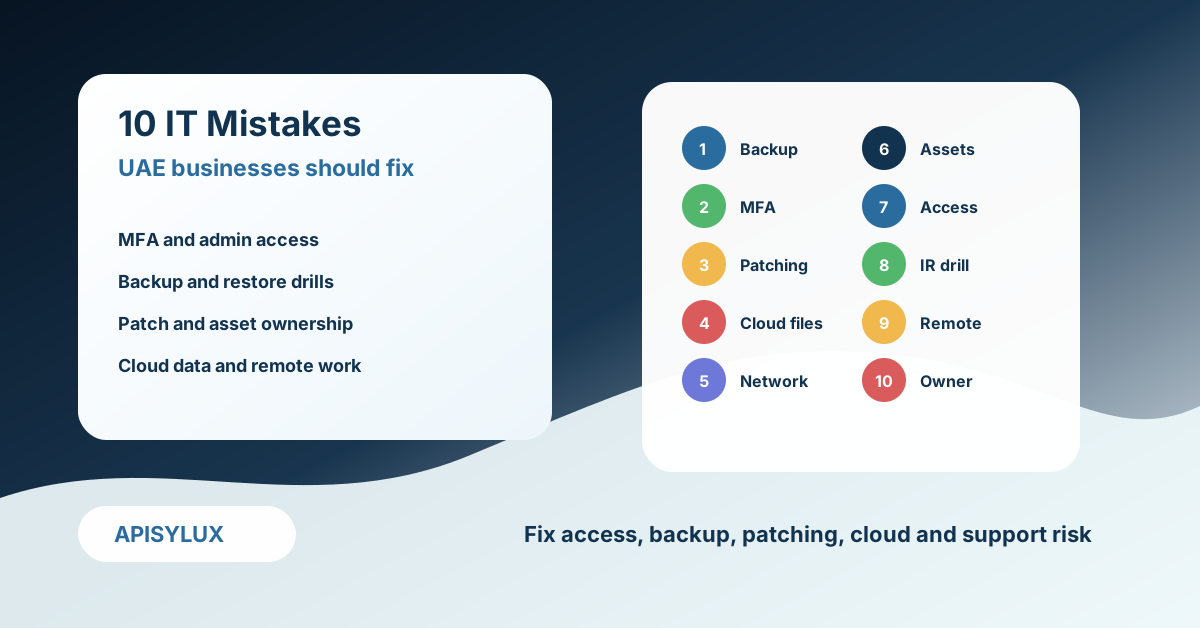
The fastest way for a UAE business to reduce IT risk is to cover the basics in the right order: enable MFA, protect admin accounts, patch critical systems, remove unsupported devices, separate business data from personal storage, document assets and vendor access, test backups, create an incident plan, and assign one owner for every critical system.
Do not start by buying another security product. Start by asking whether the business can answer four questions: what systems matter, who can access them, how quickly they can be restored, and who makes decisions during an incident.
Mistake 1: Treating RAID or sync as backup
RAID protects against some disk failures. File sync protects convenience. Neither is a complete business backup strategy. A synced cloud folder can sync corrupted or encrypted files. A RAID array can still lose data through deletion, ransomware, controller failure, theft, fire, or administrator error.
The fix is to build a recovery design, not just a storage design. Keep at least one backup path that normal users cannot delete through their daily account. Keep a restore schedule. Test recovery from real business scenarios: deleted folder, infected laptop, failed server, and locked cloud account.
Use the 3-2-1 backup strategy guide for the recovery model, and use managed backup services or TrueNAS storage solutions when the file server or backup target needs formal ownership.
Mistake 2: Running email and admin accounts without MFA
Email is usually the front door to invoices, password resets, HR messages, customer conversations, and cloud admin consoles. If Microsoft 365, Google Workspace, CRM, accounting, hosting, and domain registrar accounts do not require MFA, a password leak can become a business incident.
The fix is to enforce MFA for all users, require stronger authentication for administrators, block legacy authentication where possible, and separate daily user accounts from admin accounts. Microsoft Entra security defaults are a practical starting point for many smaller tenants, while larger tenants should use Conditional Access with named admin roles and break-glass procedures.
For Microsoft tenants, start with Microsoft 365 administration: MFA, admin role review, mailbox forwarding checks, secure score review, audit logging, and conditional access planning.
Mistake 3: Leaving systems unpatched or unsupported
Unsupported operating systems, old firewall firmware, unmaintained plugins, exposed remote access, and forgotten servers create avoidable entry points. Patch management fails when nobody owns the inventory, the maintenance window, or the rollback plan.
The fix is a monthly patch rhythm with emergency handling for critical vulnerabilities. Maintain an asset list, classify internet-facing systems, track end-of-support dates, and remove systems that nobody can patch. For websites and apps, include dependencies, CMS plugins, server packages, SSL certificates, and DNS records in the patch process.
Patch management should be paired with network monitoring so failed updates, offline devices, unusual traffic, and capacity warnings are visible before users report downtime.
Mistake 4: Using personal cloud storage for business files
Personal Drive, Dropbox, WhatsApp, and unmanaged file transfers are convenient, but they create ownership and continuity problems. When client files sit under a personal account, the business may lose control during resignation, device loss, password reset, or a privacy request.
The fix is to move business data into managed workspaces with company ownership, admin visibility, retention policies, sharing controls, offboarding steps, and backup. That may be Microsoft 365, Google Workspace, a private file server, or a private cloud layer, but the decision should be deliberate.
If data location, access ownership, and private storage are important, compare the patterns in the private Google Drive alternative guide before moving files.
Mistake 5: Keeping one flat network for everything
A flat network lets office PCs, guest Wi-Fi, CCTV, printers, NAS, servers, and point-of-sale devices see too much of each other. That makes troubleshooting easy on day one and incident containment hard when something is compromised.
The fix is to segment the network by purpose. Keep guest Wi-Fi separate. Isolate CCTV and IoT devices. Restrict server and NAS access by role. Use firewall rules between VLANs instead of trusting every device because it is inside the office.
Good segmentation does not need to be complex for a small office. Start with users, servers, guest Wi-Fi, CCTV/IoT, and management networks, then document which traffic is allowed between them.
Mistake 6: Not knowing the asset and vendor-access list
Many incidents become expensive because nobody knows what exists. Domains, DNS, hosting, CRM, payment gateways, Microsoft tenants, backup consoles, admin portals, VPN accounts, firewall users, and vendor logins are scattered across old inboxes and former employees.
The fix is a living asset and access register. Record the system owner, business purpose, admin URL, billing owner, vendor contact, renewal date, backup status, MFA status, and break-glass owner. Review it quarterly and whenever staff or vendors change.
Vendor access should be named, time-bound where possible, and reviewed after projects. Shared vendor accounts are hard to audit and hard to revoke cleanly.
Mistake 7: Over-privileged users and weak offboarding
Giving everyone admin rights is convenient until one laptop is compromised or one employee leaves. Over-privileged accounts also make accidental deletion and configuration drift more likely.
The fix is role-based access. Users should have the access needed for their job, not permanent access to every share, mailbox, admin portal, and SaaS system. Admin accounts should be separate and protected with MFA. Offboarding should disable accounts, revoke sessions, transfer ownership, remove mailbox forwarding, rotate shared secrets, and review device access.
This is where policy and tooling meet. Identity controls, endpoint management, HR exit workflows, and manager approvals must work together.
Mistake 8: Having backups but no restore or incident drill
A backup job that says "success" is not the same as a tested recovery. A business needs to know which systems come back first, who approves downtime, how customers are updated, and which evidence must be preserved.
The fix is a simple incident-response and restore drill. Pick one scenario each quarter: ransomware on a laptop, deleted finance folder, compromised mailbox, failed firewall, or unavailable cloud tenant. Time the restore, record blockers, and improve the runbook.
For endpoint and ransomware planning, pair recovery with endpoint security beyond antivirus. Prevention, detection, response, and recovery need to be connected.
Mistake 9: Allowing remote work without a security model
Remote work is normal, but unmanaged remote access is risky. Personal laptops, shared home PCs, weak VPN accounts, open RDP, unmanaged mobile devices, and public Wi-Fi can expose company systems.
The fix is to define who can access what, from which devices, using which authentication, and with which logging. Prefer managed devices for sensitive roles. Use VPN or zero-trust access where appropriate. Require MFA. Avoid exposing management ports directly to the internet. Keep remote access logs long enough to investigate suspicious activity.
For offices with multiple branches or remote teams, use the VPN setup guide for UAE offices and site-to-site VPN guide to plan access without overexposing internal services.
Mistake 10: Buying tools without governance or ownership
Businesses often buy antivirus, firewall licenses, backup subscriptions, password managers, cameras, SaaS tools, and cloud storage without deciding who owns the outcome. The tool exists, but alerts are unread, renewals lapse, policies drift, and nobody can explain the risk posture.
The fix is governance. Assign an owner for identity, endpoints, network, backup, cloud, website, domains, and incident response. Use a monthly IT risk review: open alerts, expired licenses, failed backups, pending patches, admin changes, vendor access, and upcoming renewals.
For companies without an internal IT manager, managed support through cybersecurity services and infrastructure monitoring can provide that operational ownership.
30, 60 and 90 day fix plan
First 30 days: enable MFA, list critical systems, identify admins, check backups, remove unsupported internet-facing systems, and document domain/DNS/hosting ownership.
Next 60 days: segment guest Wi-Fi and CCTV, clean old user accounts, block risky legacy access, move business files out of personal storage, patch firewall and server firmware, and test one restore.
Next 90 days: run a tabletop incident drill, create a quarterly IT risk review, assign system owners, build a vendor-access register, and monitor backup, patch, endpoint, and network health.
Sources checked
- NIST Cybersecurity Framework 2.0
- NIST IR 8374 Rev. 1 ransomware risk management profile
- NIST SP 800-61 Rev. 3 incident response guidance
- NIST SP 800-46 Rev. 2 remote access and BYOD guidance
- NIST SP 800-63B-4 digital identity guidance
- Microsoft Entra security defaults
- NCSC small organisations cyber security guide
- UAE Government portal: data protection laws